
Cloaked: Protect your privacy
cloakedProductivity
4.54.25K Reviews
- Version
- 2.91.7
- Installs
- 500.00K
- Age Rating
- Everyone
Screenshots
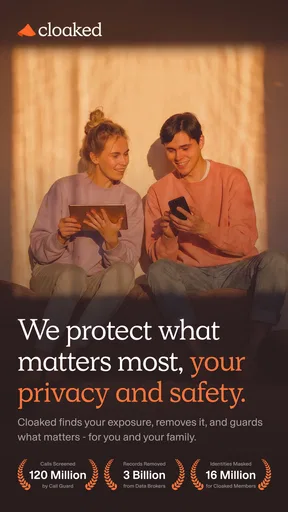
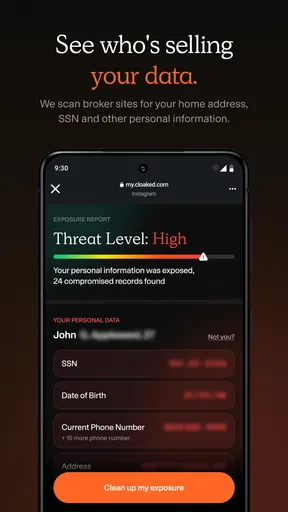
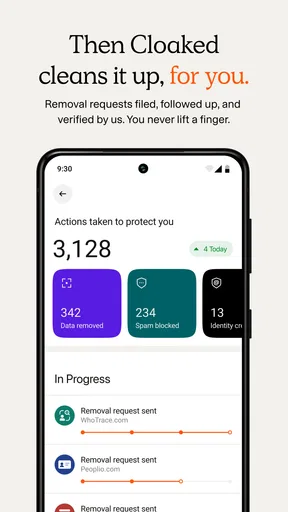
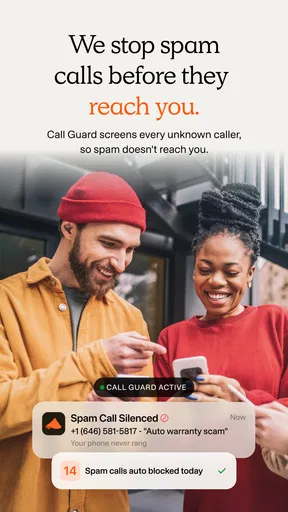
Our Review of Cloaked: Protect your privacy
 Analysis by Appyee
Privacy apps often look effortless until something interrupts the routine: a signup form rejects an address, a message does not arrive, or you cannot remember which contact detail you used. That is the practical side I would consider before relying on Cloaked: Protect your privacy. Its appeal is the ability to use alternate details instead of handing out your regular ones, but the value depends on keeping track of those choices and knowing when an alias is appropriate.
Where the routine can get stuck
The first decision is not simply whether to make a mask; it is what you want that mask to accomplish. A separate email address can help keep a promotion or newsletter away from your main inbox, while an alternate phone number can keep your everyday number out of a marketplace conversation. These are different situations, so it helps to pause before creating a detail and decide whether you may need replies, account recovery, or ongoing contact later.
That distinction matters when a service sends a one-time code or a confirmation message. If you use an alternate detail, check that it is the one associated with the account and that you can find it again when a message arrives. A privacy tool can reduce unnecessary exposure, but it cannot make a missed verification message useful. I would avoid using a disposable-looking contact for an account whose access you cannot afford to lose.
Payment information deserves even more care. The original appeal of masked details is easy to understand, but a payment-related mask is not a reason to skip checking the merchant, the amount, or the terms of a purchase. I would treat it as one part of a cautious checkout, not as a guarantee that a transaction is safe or that every seller will accept an alternate detail.
Small setup checks that prevent confusion
Before using a new mask, I would make a simple note of the service it is for and the reason I created it. That habit is useful when a message turns up weeks later and the sender’s name is unfamiliar. It also prevents the opposite problem: reusing one alternate contact everywhere until it becomes just as widely shared as the real one.
Try the workflow first with a low-stakes signup, such as a newsletter you can unsubscribe from easily. Check that you can locate the mask afterward and understand where replies are expected to go. This gives you a chance to learn the dashboard without making your first experiment an account you depend on for work, banking, or password recovery.
If the app seems to suggest more masks than you need, make a rule for yourself rather than accepting every prompt. For example, reserve a distinct mask for a service that will contact you repeatedly, and use a separate one for a one-off inquiry. The trade-off is a little organization now in exchange for being able to identify the source of unwanted messages later.
Recovering a workflow when something goes wrong
When a signup fails, I would first check for a typo in the form and confirm that I selected the intended kind of contact detail. Then I would look at the service’s own instructions: some sites reject alternate details, and repeating the same attempt is unlikely to help if the site is the one refusing them. Switching to a real contact detail may be the practical choice for a service where reliable access matters more than keeping the address separate.
If you are waiting for a reply or code, check the relevant mask and the account you used to create it before generating another one. Creating a replacement too quickly can leave you unsure which detail the service has on file. A short record of the service name and the mask you used can make this kind of recovery much less frustrating.
For a marketplace exchange, I would keep the conversation within the service’s normal process and avoid sharing extra personal information just because a buyer or seller asks. An alternate number can help limit exposure, but good judgment still matters: be cautious with unexpected payment requests, rushed arrangements, or attempts to move the conversation somewhere you do not trust.
When the app may not be the cause
A delayed message does not automatically mean the privacy app has failed. The sender may not have sent it yet, the service may be having trouble, or the signup site may not accept the detail you chose. Check the message status and the service’s own account settings before changing several masks at once. That way, you avoid adding extra variables while trying to work out where the problem started.
It is also worth separating privacy from broader security. Masking contact information can make it harder for every site to connect your activity to the same address or number, but it does not replace a strong, unique password, careful handling of verification codes, or attention to suspicious links. I would use Cloaked as a way to limit what I disclose, not as a substitute for basic account safety.
People sharing devices or helping a family member should agree on who manages the masks and where account details are recorded. The tool may help reduce exposure, but a confusing handoff can create its own problem if nobody remembers which contact detail belongs to an important account. For a child, I would also pair any privacy measure with age-appropriate conversations about what should never be shared online.
Who gets the most from masked details
I see the strongest everyday fit for people who sign up for many services, sell items online, or regularly give contact information to businesses they do not expect to know personally. A freelancer could keep a separate contact for a temporary project inquiry, while someone shopping online could use a different email for a store’s updates. The benefit is not that every interaction becomes anonymous; it is that one leak or wave of marketing is less likely to reach the contact detail used everywhere else.
It is less suitable for someone who wants a hands-off system and has no interest in tracking which detail belongs to which account. It may also be the wrong choice when a service requires a stable, familiar contact method for identity checks or account recovery. In those cases, the simpler option is to use a dedicated email address or the contact information the service expects, then manage privacy through that account’s settings.
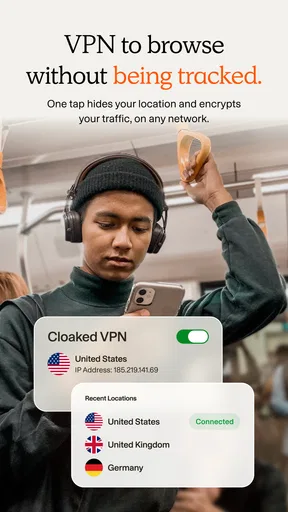
Compared with a standard email alias or a separate inbox, Cloaked’s broader appeal is that its privacy approach includes more than email. A separate inbox can be easier if email sorting is the only problem you are solving; a password manager is the better fit for organizing credentials; and a virtual private network addresses a different part of online privacy. These tools are not interchangeable. I would choose Cloaked when limiting exposure of personal contact details is the main goal, rather than expecting it to cover every privacy or security need.
What to expect from the app and its cost
Cloaked is a free productivity app from cloaked, with in-app purchases ranging from $4.49 to $143.99 per item. I would start by deciding which parts of the workflow I actually use before considering a purchase. The free starting point makes it easier to explore the idea, but the range of optional purchases means it is sensible to check what an item includes and whether it fits your habits rather than assuming every privacy feature is part of the same plan.
The app has an average rating of 3.9 from around 3.8 thousand ratings, and it has passed 100 thousand installs. Those figures give a rough sense of its audience, not a guarantee that the experience will match yours. It is rated for Everyone, was released on September 30, 2023, and its current version is 2.78.1; it requires Android 10 or later. If you are comparing devices or versions, check that your phone meets that requirement before building a workflow around it.
Security Made Simple
First things first, Cloaked is super easy to set up. I’d say it’s as straightforward as ordering a pizza online. You download the app, create an account, and voilà! You’re ready to dive into its array of features. What really caught my attention is how it doesn't bombard you with complex jargon. It’s designed with the average Joe in mind, making privacy accessible for everyone.
Features That Stand Out
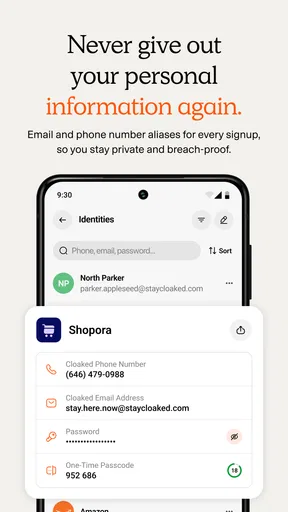
So, what makes Cloaked tick? The app primarily focuses on masking your personal information. This means you can generate fake emails, phone numbers, and even credit card details. Why would you need this? Well, think about those endless spam emails you get after signing up for a newsletter. With Cloaked, you give them a decoy email and keep your real inbox squeaky clean.
Another feature I found super handy is the temporary phone numbers. If you’re someone who often buys and sells things online, this is a game-changer. You don’t have to worry about your phone number floating around on the internet, which can be a relief if you’re protective of your privacy.
How It Works
Using the app is a breeze. You can create and manage your masks from the dashboard. The interface is intuitive, with everything laid out clearly. I found it pretty satisfying to see all my masks organized in one place. There’s also a nifty little feature where you can track which masks are being used and how often. It’s like having an insider view of your own privacy.
Performance and Usability
Performance-wise, Cloaked runs smoothly without any noticeable lags or crashes on my device. I’ve tried it on both Android and iOS, and it works seamlessly across both platforms. It integrates well with other apps and services. I’ve used it for emails, social media, and even online shopping, and it holds up like a champ.
One small hiccup I noticed is that the app can sometimes be a little too eager in suggesting masks. For someone new to privacy apps, this might be a bit overwhelming, but once you get the hang of it, you’ll appreciate the thoroughness.
Who Will Benefit?
Cloaked is perfect for anyone who’s fed up with spam or worried about their digital footprint. It’s a boon for freelancers, online sellers, and anyone who values their privacy. Even if you’re just a regular internet user, this app can give you peace of mind.
Parents might find it particularly useful to protect their kids’ online identities. In today’s world, where kids are online more than ever, having that extra layer of protection is invaluable.
Final Thoughts
Overall, Cloaked: Protect your privacy is a solid choice if you’re looking to safeguard your personal information without jumping through hoops. It’s user-friendly, efficient, and does exactly what it promises. While there might be a slight learning curve for some, the benefits far outweigh the minor inconveniences.
With the growing concerns around data privacy, having a tool like Cloaked in your arsenal is not just smart; it’s essential. So, if you’re ready to take control of your digital life, give Cloaked a try. You might just find it’s the privacy partner you didn’t know you needed.
Ready to dive into a safer digital experience? You can download Cloaked: Protect your privacy from the app store and start your journey to a more secure online presence today!
Privacy and Permissions
See what permissions an app requests and how it handles your data.
- Contacts
- read your contacts, modify your contacts
- Location
- approximate location (network-based), precise location (GPS and network-based)
- Phone
- directly call phone numbers, read phone status and identity
- Photos/Media/Files
- read the contents of your USB storage, modify or delete the contents of your USB storage
- Storage
- read the contents of your USB storage, modify or delete the contents of your USB storage
- Camera
- take pictures and videos
- Microphone
- record audio
- Wi-Fi connection information
- view Wi-Fi connections
- Device ID & call information
- read phone status and identity
- Other
- view network connections, change network connectivity, control flashlight, full network access, change your audio settings, control Near Field Communication, run at startup, control vibration, prevent device from sleeping
Verdict
Strengths of Cloaked: Protect your privacy
- Easy-to-use interface for all users.
- Advanced encryption ensures data safety.
- Customizable privacy settings available.
- Supports multiple platforms seamlessly.
- Real-time alerts for suspicious activities.
Limitations of Cloaked: Protect your privacy
- Limited features in free version.
- Occasional app crashes reported.
- Requires constant updates.
- Some features are complex to set up.
- High battery usage on older devices.
Similar Picks in This Category
View All
Google Calendar
Google LLC4.6

Google Drive
Google LLC4.3

Google Assistant
Google LLC3.9

Microsoft OneDrive
Microsoft Corporation4.6

Samsung Calendar
Samsung Electronics Co., Ltd.4.1

Microsoft OneNote: Save Notes
Microsoft Corporation4.6
Frequently Asked Questions
What is Cloaked and how does it protect my privacy?
Cloaked is a privacy-focused app designed to safeguard your personal information. It offers features such as temporary email addresses, phone numbers, and masked credit card details to prevent data tracking. By using Cloaked, you can interact online without exposing your real identity, thereby minimizing the risk of data breaches and identity theft.
Is Cloaked available on both Android and iOS platforms?
Yes, Cloaked is available for download on both Android and iOS devices. You can easily find it on the Google Play Store for Android users and the Apple App Store for iOS users. This cross-platform availability ensures that you can maintain your privacy regardless of the device you use.
Does Cloaked offer a free version, or do I need to subscribe?
Cloaked provides both a free version with basic privacy features and a premium subscription model for advanced functionalities. The free version allows you to try essential tools like temporary email addresses. However, the premium version offers enhanced privacy options, including unlimited masking and priority support.
How user-friendly is Cloaked for someone not tech-savvy?
Cloaked is designed with an intuitive interface to cater to users of all tech levels. The app provides step-by-step guides and easy-to-navigate menus, making it simple for anyone to set up and manage their privacy settings. Its user-friendly design ensures that you can protect your information without any technical expertise.
Can Cloaked be used for business purposes?
Absolutely, Cloaked can be beneficial for businesses that require secure communication and data protection. It helps businesses manage sensitive information, protect client data, and maintain confidentiality by providing tools to mask emails, phone numbers, and payment information. This makes it an excellent choice for professionals aiming to enhance their digital privacy.
